Tags vs Hashtags vs Keywords
These are four separate things, not two or three. Here is the real difference, and where each one lives.
Quick answer
These are four separate things, not two or three. Video tags are a hidden per-video field. Channel keywords are a separate hidden field describing the whole channel. Hashtags are visible to viewers and placed in the title or description. Keywords is not a field at all - it just means the actual words used in your title, description, and spoken content, and it is the one that matters most for ranking.
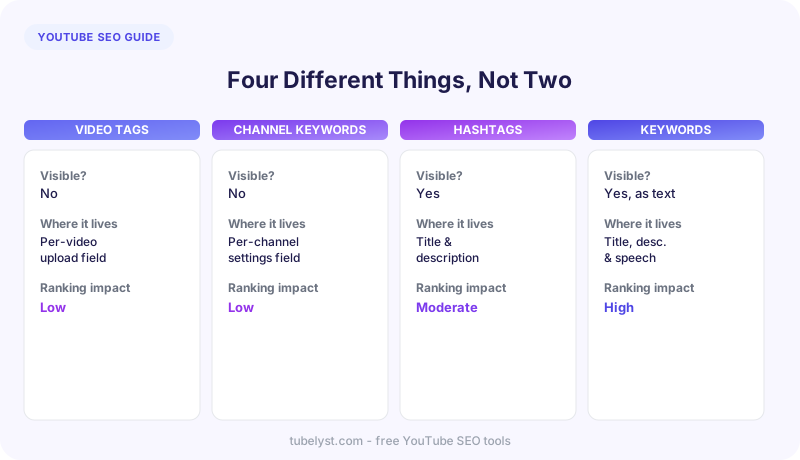
The four-way breakdown
Video tags
A hidden metadata field, set per video in YouTube Studio, with roughly a 500-character budget across all of them combined. Not visible anywhere a viewer looks. Their main remaining job is helping YouTube match misspelled or ambiguous searches to the right video - not general ranking.
Channel keywords
A separate hidden field, set once for the entire channel under YouTube Studio - Settings - Channel - Basic info. This is the one most tags vs keywords articles skip entirely, or accidentally lump in with video tags - it is neither. It describes the channel as a whole, not any individual video, and a creator typically sets it once and rarely revisits it.
Hashtags
Visible to viewers, typed directly into a video title or description with a #. YouTube recognizes up to 15 per video; the first three used in the description appear as clickable links above the video title. Anything past 15 is simply ignored - not penalized, just uncounted.
Keywords (in the general SEO sense)
Not a field anywhere - keywords here just means the actual words that show up in your title, description, and spoken or captioned content. This is the one with the most real ranking influence of the four, precisely because it is not a separate box to fill in - it is woven through everything YouTube actually reads to understand a video.
Which tool reads which
| You want to check | Field it reads | Tool |
|---|---|---|
| A specific video tags | Video tags | Tag Extractor |
| Which tags a channel reuses most | Video tags, aggregated | Top Tags Across a Channel |
| A channel overall keyword setting | Channel keywords | Channel Keywords Extractor |
| A channel actual title/description patterns | Keywords (general sense) | Description Extractor |
Hashtags are not covered by a dedicated tool here yet - they are visible in any video description directly, which is the fastest way to check them for now.
Tags vs hashtags vs keywords - common questions
Are YouTube tags and channel keywords the same thing?
No - they are two separate fields entirely. Video tags are set per upload and describe that one video. Channel keywords are set once, under YouTube Studio channel settings, and describe the channel as a whole. A channel tags and its channel keywords are often completely different lists.
Do hashtags actually help a YouTube video rank higher?
Not for search ranking directly - their main value is visible categorization. The first three hashtags used in a video description appear as clickable links above the title, letting viewers browse related videos by that hashtag. Beyond 15 hashtags per video, YouTube simply stops counting any of them.
What is the real difference between tags and keywords?
Tags are a specific, hidden field with a character limit, filled in once per video. Keywords are not a field at all - they are just the actual words used in a title, description, and spoken content, which is why they carry far more ranking weight than tags do.
How many hashtags should I actually use on a video?
YouTube recognizes a maximum of 15 hashtags per video across the title and description combined - anything beyond that is ignored entirely, not just capped. Using three to five relevant ones is generally enough to get the above-the-title placement benefit without diluting relevance.
Where do I check a channel channel keywords specifically?
They live in YouTube Studio Settings Channel Basic info, and they are not visible anywhere in YouTube normal viewing experience. For your own channel, check that setting directly; for any other public channel, the Channel Keywords Extractor reads the same field.